Title: Linode Rescue Mode
Created: 19 Jun 2024 Modified: 19 Jun 2024Description: How to use rescue mode in linode
Enable SSH
- Get into the Linode Dashboard
- Find you machine to be rescue
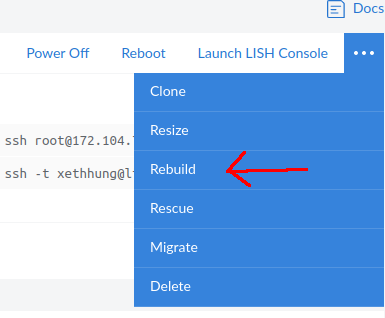
Launch LISH Console
- change a temporary password by
passwd(A very temporary password for only short period of access to the rescue mode server) - start the ssh service
service ssh start
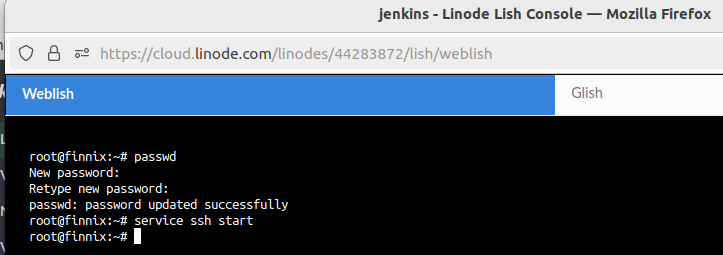
- now you can access to the server through ssh locally

Mount the disk
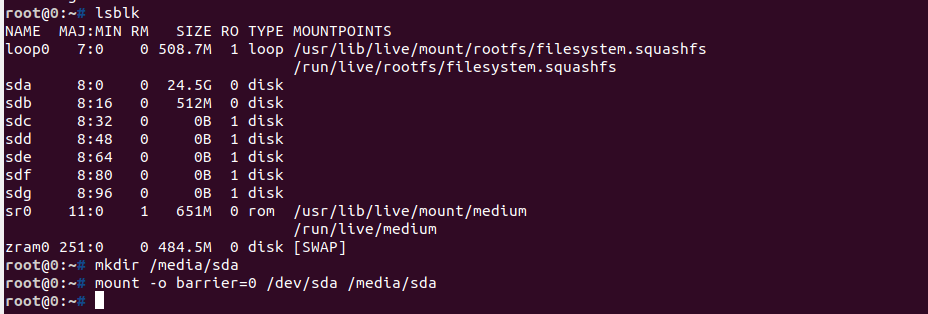
- Normally the main dirver will be
/dev/sda(but you could check the driver by using commandlsblk) - Create a folder under
/mediaby commandmkdir /media/sda - Mount the drive by command
mount -o barrier=0 /dev/sda /media/sda
Modify SSH authorized_keys
In case you are losing you ssh key, you can modify /media/sda/root/.ssh/authorized_keys to add you new ssh public key.
You may use the command to install vim for update the file.
apt update -y && apt isntall vim -y
After that, you could restart the Reboot the server on the Linode console page.
Now you are able to use the new SSH Key to access to the server.