MySQL
MySQL is an open-source relational database management system (RDBMS). Its name is a combination of “My,” after co-founder Michael Widenius’s daughter, and “SQL,” which stands for Structured Query Language.
As an RDBMS, MySQL organizes data into one or more tables where data can be related to each other, helping to structure the information. Programmers use SQL to create, modify, and extract data from these relational databases, as well as to control user access.
MySQL is widely used with other programs to implement applications requiring relational database capabilities. It is a key component of the LAMP web application software stack (Linux, Apache, MySQL, Perl/PHP/Python) and is utilized by many database-driven web applications like Drupal, Joomla, phpBB, and WordPress. Popular websites such as Facebook, Flickr, MediaWiki, Twitter, and YouTube also use MySQL.
Web Site
Tools
- MySQL Server
- MySQL Workbench
- MySQL Shell
- phpMyAdmin
Check My Sql Version
-
Doing in command line
mysql -V -
Doing in sql client
SHOW VARIABLES LIKE "%version%";
Extract JSON field from JSON type Json type:
{
  "checkTime":123456
}
Extract query:
select JSON_EXTRACT(tableA,'$.checkTime') from schemaA.tableA
Dumping database from mysql
The following code snippet shows how to dump mysql database for backup purpose.
dateStr=$(date +"%Y_%m_%d")
mysqldump \
        --user={username} \
        -p{password} \
        --databases {dbname} > {dbname}$dateStr.sql
Set MySQL from utf8 to utf8mb4
MySQL’s utf8 character set only supports up to 3 bytes per character, which means it cannot store certain Unicode characters (such as emojis and rare CJK characters). utf8mb4 is the recommended character set for full Unicode support (4 bytes per character).
Why switch to utf8mb4?
- Full Unicode support (including emojis and rare characters)
- Avoid data loss or errors when storing 4-byte characters
- Better compatibility with modern applications
Recommended collation:
- For MySQL 5.7 and below:
utf8mb4_unicode_ci - For MySQL 8.0+:
utf8mb4_0900_ai_ci(improved Unicode sorting)
Steps:
-
Find your MySQL configuration file (often under
/etc/mysql, but may vary):cd /etc/mysql ll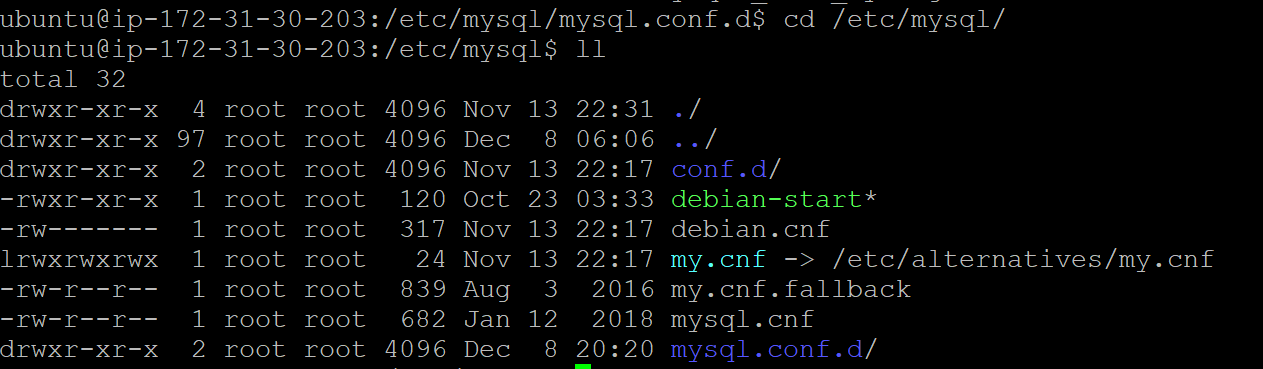
-
Check for
!includedirdirectives inmy.cnformysqld.cnfto locate additional config files (e.g.,/etc/mysql/mysql.conf.d). -
Backup your configuration file:
cd /etc/mysql/mysql.conf.d/ cp mysqld.cnf mysqld.cnf_bk_{date} -
Add or update these settings in
mysqld.cnf:[client] default-character-set = utf8mb4 [mysql] default-character-set = utf8mb4 [mysqld] character-set-client-handshake = FALSE character-set-server = utf8mb4 collation-server = utf8mb4_unicode_ciFor MySQL 8.0+, you may use
collation-server = utf8mb4_0900_ai_cifor better Unicode support. -
Restart MySQL server:
sudo service mysql restart -
Check the result:
SHOW VARIABLES WHERE Variable_name LIKE 'character\_set\_%' OR Variable_name LIKE 'collation%';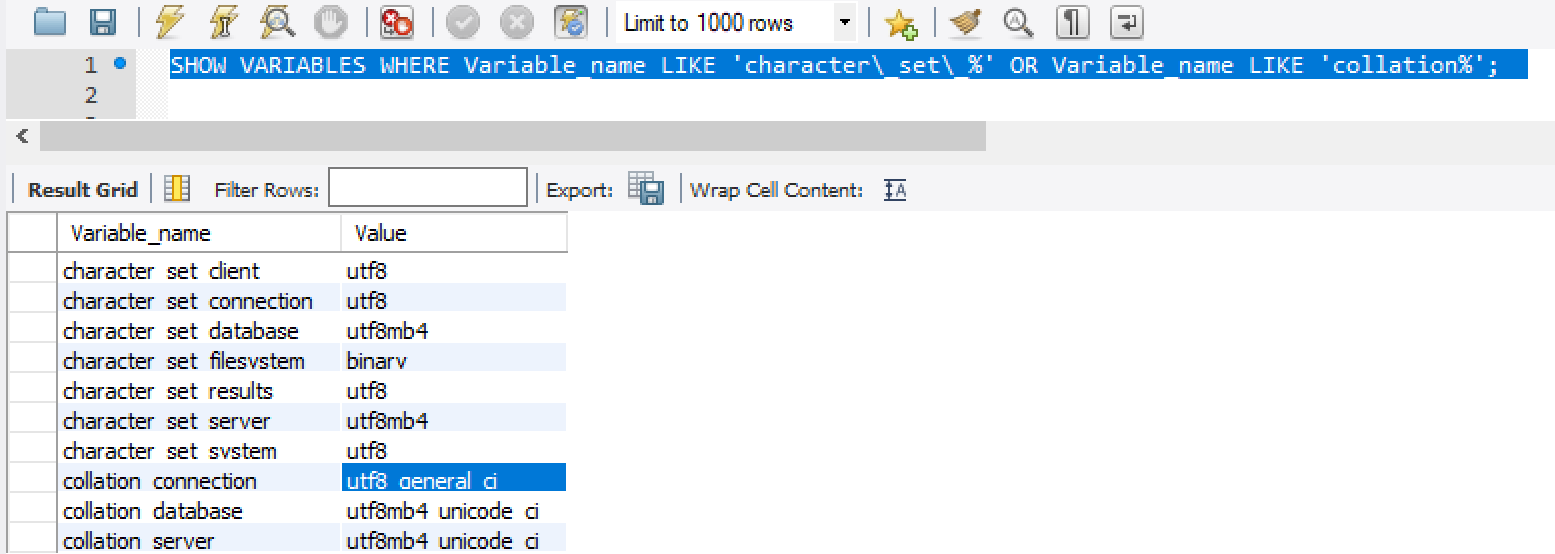
Converting existing databases/tables/columns:
If your database, tables, or columns were created with utf8, you should convert them to utf8mb4 to avoid issues with 4-byte characters.
ALTER DATABASE dbname CHARACTER SET = utf8mb4 COLLATE = utf8mb4_unicode_ci;
ALTER TABLE tablename CONVERT TO CHARACTER SET utf8mb4 COLLATE utf8mb4_unicode_ci;
For MySQL 8.0+, use
utf8mb4_0900_ai_ciif desired.
Warning:
- If you have existing data with 4-byte characters in
utf8columns, you may encounter errors or data truncation. Always backup your data before making changes.
References: