HashiCorp Vault
Web Site
Vault Structure
HashiCorp Vault is designed around a core set of components that work together to manage secrets and identity. Understanding these building blocks is crucial for operating Vault effectively. It uses a component-based architecture to decouple identity from the secret data itself.
1. Authentication (Auth Methods)
Before anyone (user or machine) can interact with Vault, they must authenticate. Auth Methods are the components that perform this verification. Vault supports a wide variety of methods to suit different environments:
- Human-oriented: Userpass (username/password), LDAP, OIDC, GitHub.
- Machine-oriented: AppRole (for servers/apps), Kubernetes, AWS, Azure, GCP.
Key Concept: Authentication does not directly grant access to secrets. Instead, successful authentication returns a Token.
2. Tokens
The Token is the core unit of authentication within Vault. Once an Auth Method verifies an identity, Vault issues a token to that client.
- All subsequent requests to Vault must include this token (usually in the
X-Vault-Tokenheader). - Tokens have properties like Time-To-Live (TTL), meaning they expire after a set time, and are associated with specific Policies.
3. Policies
Policies are the authorization layer (RBAC). They define what a token can do.
- Policies are written in HCL (HashiCorp Configuration Language).
- They work by matching paths. Since everything in Vault is addressed via a path (like a URL), policies allow or deny capabilities (create, read, update, delete, list) on those paths.
- Example: “Allow read access to
secret/data/webapp/*”.
4. Secret Engines
This is where the actual secrets live. Secret engines are plugins that store, generate, or encrypt data.
Main Secret Engines:
-
Static Secrets:
- KV (Key-Value) Engine: Stores static secrets (API keys, config files, passwords). This guide mainly focuses on the KV secret engine.
-
Dynamic Secrets:
- Database Engine: Generates dynamic database credentials on demand.
- AWS Engine: Generates dynamic AWS IAM credentials.
- PKI Engine: Issues and manages certificates.
- SSH Engine: Issues SSH credentials.
- TOTP Engine: Generates time-based one-time passwords.
-
Encryption as a Service:
- Transit Engine: Provides encryption and decryption as a service (encrypt/decrypt data without storing it).
Mounting: Secret engines are “mounted” at specific paths. You can mount the same engine multiple times at different paths (e.g., secret/ for general secrets and apps/ for application secrets).
5. Paths & Namespaces
Vault behaves like a virtual filesystem.
- Mount Path: Where the secret engine is enabled (e.g.,
my-secrets/). - Secret Path: The specific location of the secret within that engine (e.g.,
my-secrets/prod/database). - API Path: When using the KV-v2 engine, the actual data is often stored at a
data/sub-path (e.g.,my-secrets/data/prod/database) to handle versioning.
Putting It All Together (The Logic: Retrieving a Secret from KV Engine)

- Login: A client (e.g., a web server) sends credentials (like a RoleID and SecretID) to the AppRole Auth Method endpoint.
- Verification: Vault checks the credentials. If valid, it generates a Token.
- Policy Attachment: Vault looks up which policies are assigned to that AppRole and attaches them to the Token.
- Request: The client wants to read a secret (e.g., an API key or password). It sends a request to
secret/data/myapp/config(for KV v2) including its Token. - Authorization: Vault checks the Token’s policies. Does this token have
readpermission onsecret/data/myapp/config? - Action: If yes, the KV Secret Engine retrieves the stored secret data (e.g., username and password) from the specified path.
- Response: Vault returns the secret data to the client.
Start a Vault Instance
Command Line for dev mode
vault server -dev
Docker Compose
The startup requires docker for quick and easy initialization.
docker-compose.yaml and the config/config.hcl is mandatory requirements.
-
Create docker compose file
-
Create configuration file under
config/ -
Start the service
docker compose up -d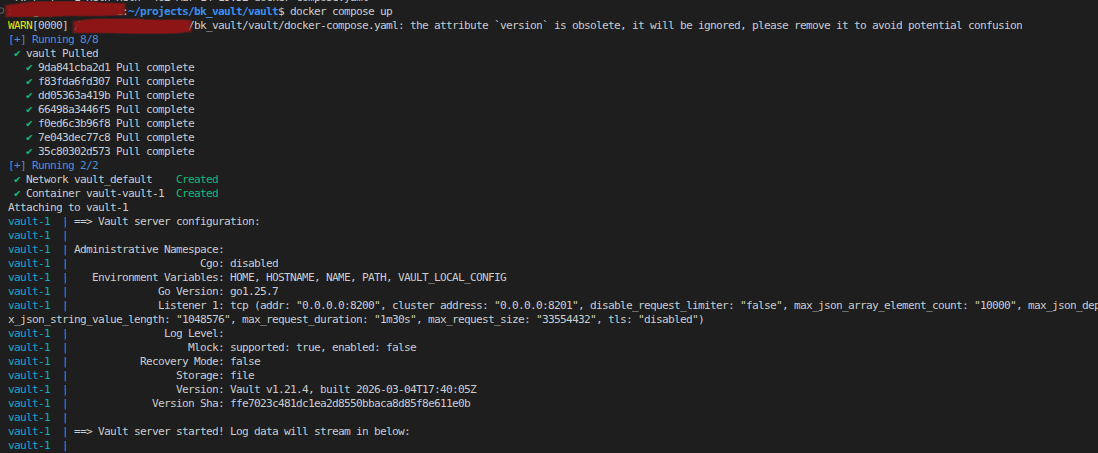
-
Setup the vault address
export VAULT_ADDR=http://localhost:8200 -
type
vault operator init, the vault will init and generate [Vault Initialization Docs]- the unseal keys for later on usage (remember keep it safe)
- the Initial Root Token (used for accessing the vault)
vault operator init
# vault operator init -key-shares={number of keys} -key-threshold={number to unlock}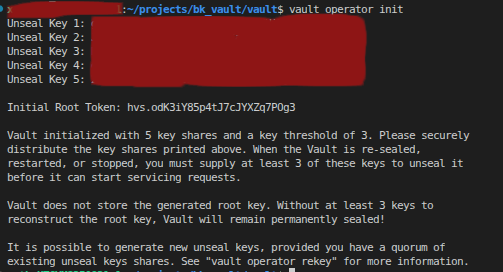
-
type
vault operator unseal <Unseal_Key>for unseal the vault
Login to the vault
There is only a one method that user can access to the vault server, providing a vault token (set up envrionment variable VAULT_TOKEN).
Command as export VAULT_TOKEN={token} in linux.
Command as set VAULT_TOKEN={token} in CMD Windows.
Root Token (life long token)
But there is multiple ways to acquire a vault token, the raw and easiest way is that when the vault is first time init throught vault operator init method, the unseal token and the root token is generated automaticall. officially, if user don’t do anything, the root token should be a powerful and life long vault session token, which mean the root token is never expired.
Other Token (token expires by default)
In vault server, there is a lot of authentication method for accessing the vault server.
User can user vault auth list to view the current enabled authentication method.
Approle
Approle is one of the main methodology for accessing the machines or application to access to the vault server.
Use vault auth enable approle to enable the approle in vault serve
Creation
Normally below script cover most of the setting on creating a approle.
vault write auth/approle/role/{role name} \
    policies="policy1,policy2" \
    secret_id_ttl="24h" \
    token_ttl="1h" \
    token_max_ttl="4h" \
    secret_id_num_uses=10 \
    token_num_uses=5 \
    enable_local_secret_ids=true
- policies: Comma-separated list of policies to attach.
- secret_id_ttl: Time-to-live for SecretID (e.g., 24h). If set to 0, the SecretID will never expire. Each new SecretID can have its own TTL, allowing for credential rotation and limiting exposure.
- token_ttl: The default time-to-live (TTL) for tokens issued by the AppRole. If not specified, tokens will use this value for their expiration.
- token_max_ttl: The maximum TTL a token can have. Even if a token is renewed, it cannot exceed this value.
- secret_id_num_uses: Number of times a single SecretID can be used for authentication. This does not limit the total number of SecretIDs that can be generated for the AppRole.
- token_num_uses: Number of times a single token can be used for authentication. If greater than 0, the token will become invalid after it is used the specified number of times. You must re-authenticate to obtain a new token.
- enable_local_secret_ids: If true, SecretIDs are not replicated and are only valid on the node where they were created. This is useful for security isolation in multi-tenant clusters, compliance requirements (e.g., credentials must be generated and used only on a single machine), disaster recovery (preventing SecretIDs from being available on standby nodes), or performance optimization in large clusters. For example, in a cluster spanning multiple data centers, you may want SecretIDs generated in one data center to be valid only there.
For simplicity, if you want an AppRole that works indefinitely, but each issued token is valid for only 10 minutes, you can define the AppRole as below:
vault write auth/approle/role/{role name} \
    policies="policy1,policy2" \
    token_ttl="10m"
Role ID
RoleID is the unique identifier for an AppRole in Vault. It acts as the first factor in AppRole authentication and is required (along with SecretID) to log in and obtain a token.
Set a custom RoleID: Vault allows you to set a custom RoleID when creating or updating an AppRole:
vault write auth/approle/role/{role name} role_id="{custom_role_id}"
This can be useful for integration with external systems or for easier management.
Retrieve a RoleID:
vault read auth/approle/role/{role name}/role-id
Secret ID
SecretID is a credential used in Vault’s AppRole authentication method. It acts as a second factor (along with RoleID) to authenticate machines or applications securely.
Generate a SecretID:
vault write -f auth/approle/role/{role name}/secret-id
This command returns a new SecretID for the specified AppRole.
Important: SecretIDs cannot be set manually—they can only be generated by Vault. This ensures that no one can predict or predefine the next SecretID, enhancing security.
This command returns a new, unpredictable SecretID for the specified AppRole.
Login to get a Token
To log in to Vault using AppRole, use the following command with your RoleID and SecretID:
vault write auth/approle/login role_id="{role_id}" secret_id="{secret_id}" # token will return by this command
This will return a Vault token that you can use to access secrets according to the policies attached to the AppRole.
KV Secret Engine
KV Secret Engine: Usage and Operations
The KV (Key-Value) secret engine is the most common way to store static secrets in Vault. Below are the typical operations:
1. Enable a KV secret mount: You can enable a KV engine at a specific path (e.g., “mysecrets”):
vault secrets enable -path=mysecrets kv
For KV v2 (with versioning):
vault secrets enable -path=mysecrets kv-v2
2. List all secret mounts: To see all enabled secret engines:
vault secrets list
3. List secret paths under a given secret mount: To list keys (secret paths) under a mount (e.g., “mysecrets”) for both KV v1 and KV v2, use:
vault kv list mysecrets/
The CLI handles the versioning and path details internally for KV v2.
4. Store (put) secret data at a secret path: To store secret data at a path:
vault kv put mysecrets/myapp username="admin" password="s3cr3t"
This command writes the key-value pairs to the specified path.
5. Get the secret payload from a secret path: To retrieve the secret data stored at a path:
vault kv get mysecrets/myapp
The CLI handles the versioning and path details internally for KV v2.
Basic
Check Vault Status
vault status